
Real UART Problems in Embedded Linux and MCU Systems — Boot Failure, DMA Conflict, and JLINK Download Issues
UART (Universal Asynchronous Receiver/Transmitter) is one of the most widely used communication interfaces in embedded systems.
From:
UART is everywhere.
Because UART is simple, engineers often underestimate how dangerous it can become during:
Many embedded engineers eventually encounter mysterious problems such as:
What makes UART debugging particularly painful is that these issues are often:
✔ intermittent
✔ timing-sensitive
✔ difficult to reproduce
✔ highly hardware-dependent
In many cases, the root cause is not the UART peripheral itself, but the interaction between UART, DMA, bootloaders, and external devices.
This article discusses several real-world UART debugging pitfalls and practical engineering solutions for improving system reliability.
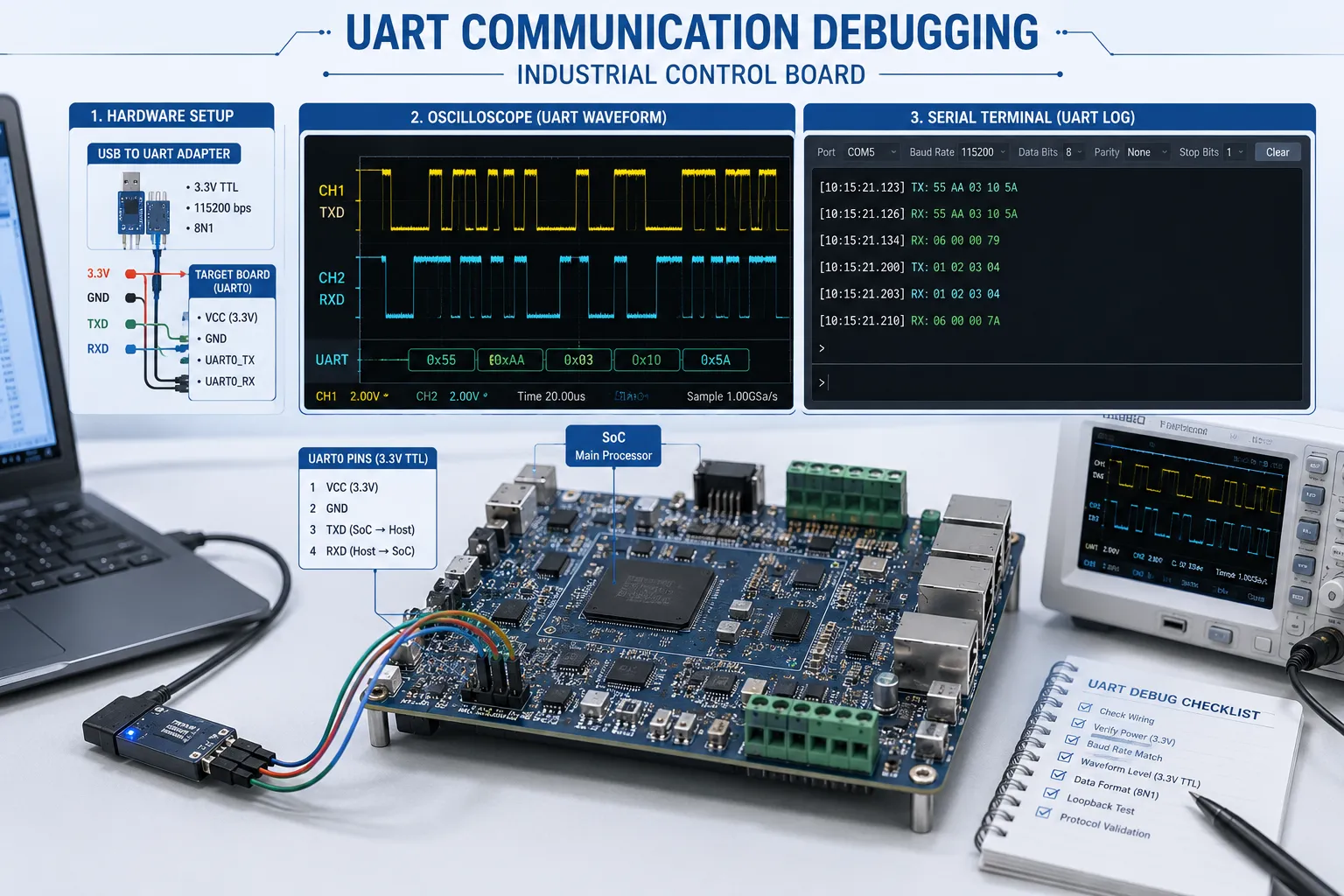
UART communication appears simple:
TX → RX
However, modern embedded systems introduce much more complexity:
A small voltage transition on the UART line during system startup may unexpectedly affect the internal UART state machine.
Unlike obvious hardware failures, UART issues are frequently timing-related.
This means:
These characteristics make UART bugs extremely frustrating during development.
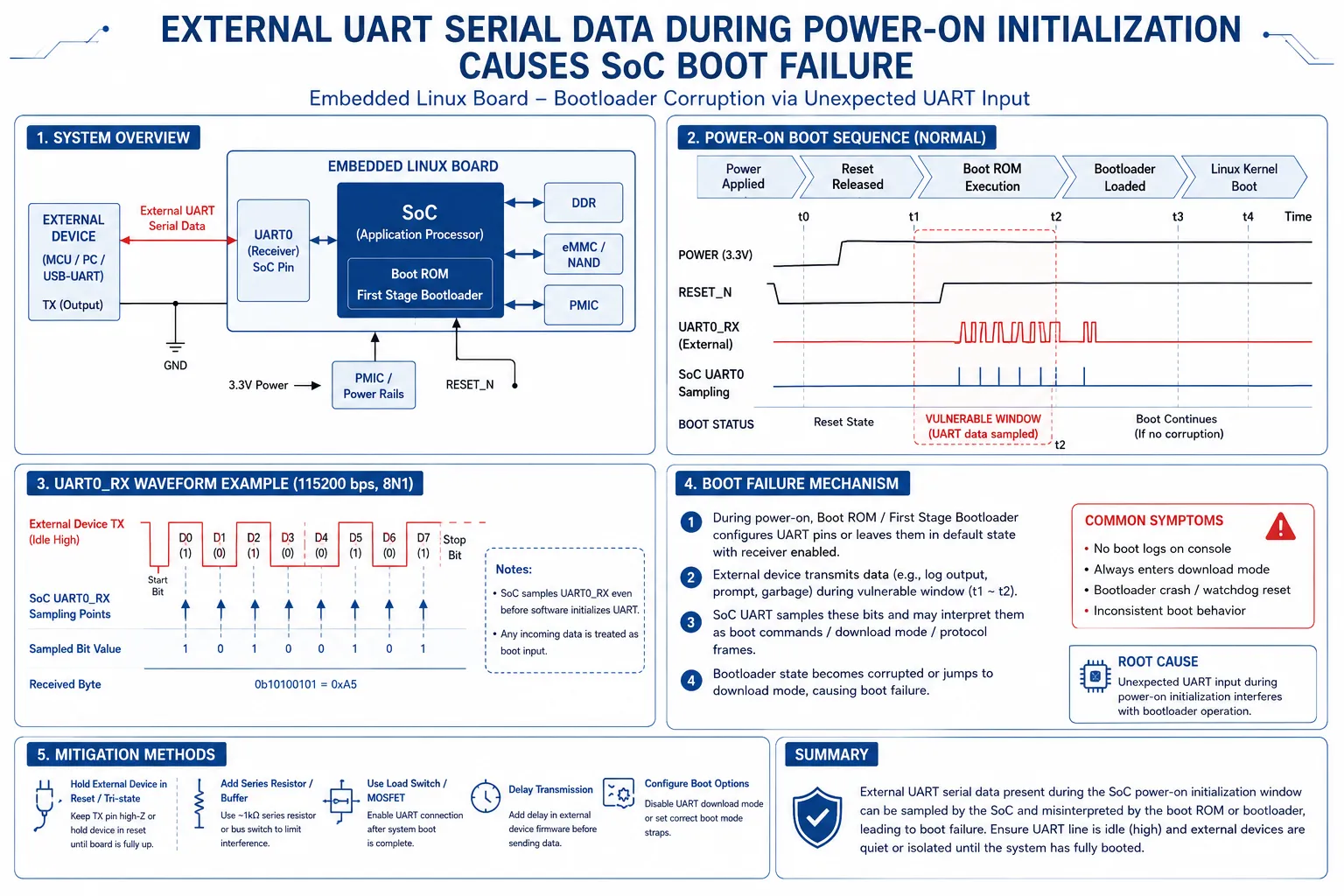
One of the most confusing problems in embedded Linux systems occurs when external UART data arrives during SoC initialization.
The board:
Most importantly:
❌ The issue is not 100% reproducible.
Sometimes the board works perfectly.
Sometimes it fails completely.
This randomness often leads engineers to initially suspect:
However, the actual cause may simply be UART activity.
When the board powers on, some external peripherals may already be transmitting UART data.
This creates voltage transitions on the RX line before the SoC UART initialization process completes.
Certain SoCs or Linux UART drivers contain timing dependencies during early boot stages.
If unexpected UART data arrives immediately after power-on:
As a result, the SoC may become stuck during boot.
Some semiconductor vendors explain this issue as:
Early incoming UART data during kernel initialization may be incorrectly parsed as configuration information, causing UART controller state confusion.
Many Linux-based SoCs initialize UART very early during the boot process.
At this stage:
Unexpected RX signals can therefore create abnormal timing behavior.
This becomes even more dangerous when:
Industrial environments further increase risk because external devices may continuously transmit status packets immediately after power is applied.
This is one of the most effective methods.
Instead of powering all peripherals simultaneously:
This ensures:
✔ clean UART startup
✔ stable initialization
✔ reduced timing interference
This method is widely used in industrial control systems.
Another hardware-level solution is adding a UART analog switch.
At power-on:
After initialization finishes:
This avoids external signal interference entirely.
Some designs also include:
These methods help stabilize the UART line during early startup.
Another difficult issue appears during firmware downloading.
Initially:
✔ JLINK download works normally
After several repeated downloads:
❌ flashing suddenly fails
❌ programming becomes unstable
❌ debugger disconnects unexpectedly
Surprisingly, removing one external UART device completely solves the problem.
This confuses many engineers because UART and JLINK appear unrelated.
At first glance, engineers often assume:
“UART interrupts are interfering with JLINK.”
However, interrupts alone are usually not the true problem.
The deeper issue involves DMA.
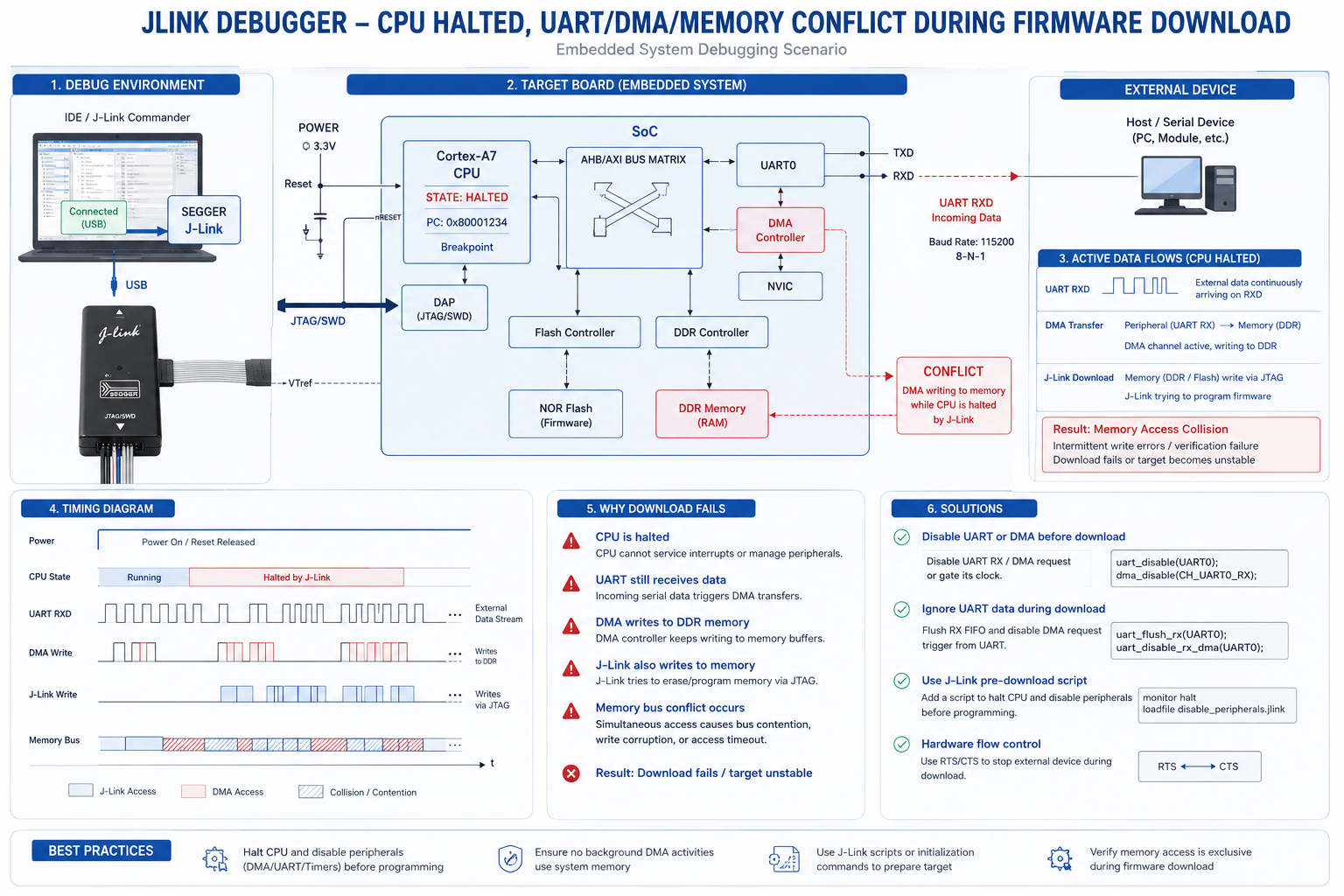
During debugging:
JLINK stops the CPU core.
However:
❌ many peripherals continue running
Especially:
These components may continue accessing internal memory even while the CPU is halted.
If UART continuously receives data:
The result:
Essentially:
Two independent systems attempt to control the same memory resources simultaneously.
DMA behaves like a small independent processor.
Even when the CPU stops:
✔ DMA may continue transferring data
✔ peripherals remain active
✔ memory buses remain occupied
This creates hidden conflicts that are difficult to observe directly.
Some chips may even enter abnormal internal states requiring:
To avoid future UART debugging disasters, engineers should consider reliability during the earliest design stages.
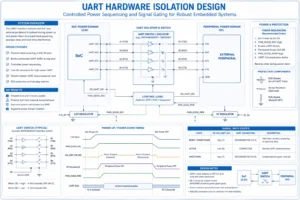
Avoid mixing:
Using external Flash storage can help isolate operations physically.
Some systems automatically disable:
before entering programming mode.
This greatly improves flashing stability.
Recommended methods include:
✔ UART switches
✔ buffer ICs
✔ isolation chips
✔ controlled power sequencing
Never assume all peripherals can safely power on simultaneously.
Good timing design is essential for industrial products.
Always test:
Many UART bugs only appear under stress conditions.
Industrial embedded systems often run continuously for years.
Unlike consumer electronics, industrial equipment requires:
UART reliability becomes especially important in:
Even a small UART design oversight may create expensive field failures later.
Reliable hardware architecture is often more important than software fixes.
Because some UART controllers and Linux drivers are sensitive to unexpected RX activity during initialization.
DMA and peripherals may continue running while the CPU is halted, creating memory conflicts during flashing.
Usually not directly. DMA activity is often the more critical issue.
Yes. Linux-based SoCs are especially sensitive because UART is initialized very early during boot.
UART debugging issues are rarely caused by UART alone.
Modern embedded systems involve complex interactions between:
Many difficult “random” problems actually originate from timing conflicts during initialization or debugging.
Understanding these hidden interactions helps engineers design more stable and reliable embedded products from the beginning.
In industrial electronics, preventing UART problems early is always easier than debugging them after deployment.