
Ensure Display Precision: Use a Diagonal Calculator to Select the Right LCD | FlyLucky

🔍 Introduction

Choosing the correct display size is one of the most critical steps in designing a device with an embedded LCD screen. Whether you’re building a smart meter, medical monitor, or POS terminal, understanding diagonal measurement—and using it correctly—ensures proper fit, usability, and cost control.

In this article, we’ll explain what a TFT LCD diagonal calculator is, why it matters, and how to use it to avoid costly sizing errors. Learn how FlyLucky helps B2B engineers and sourcing teams make data-driven decisions when customizing TFT LCD modules.


📏 What Is a Diagonal Calculator?

A diagonal calculator helps determine the diagonal screen size based on:


      • Width and height of the active area (AA)

      • Aspect ratio (e.g., 4:3, 16:9, 3:2)

      • Unit conversion (inches vs mm)

    Formula:

    This tool ensures that engineers are comparing compatible modules and visualizing correct size expectations before production.
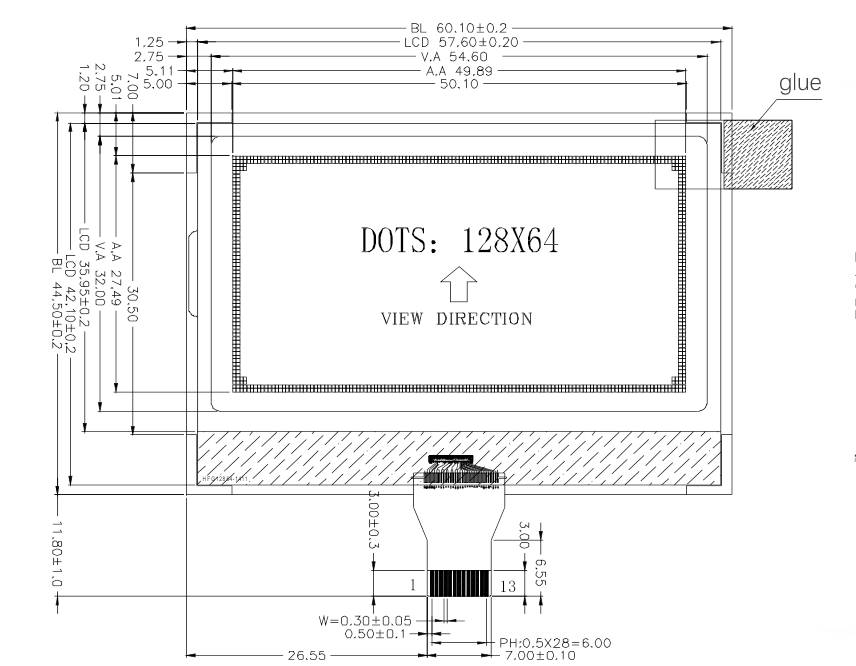
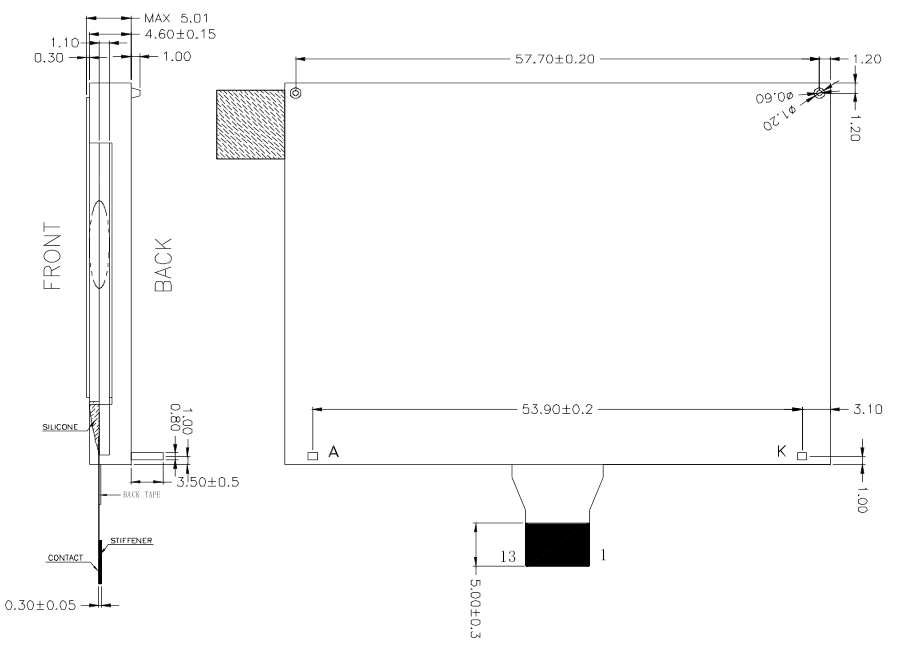
     

    LCD Screen with Dimension Callouts


    LCD Screen with Dimension Callouts
    LCD Screen with Dimension Callouts


    LCD Screen with Dimension Callouts


    📊 Why Sizing Errors Happen

    MistakeResult
    Confusing AA with outline sizeModule doesn’t fit mechanical housing
    Misreading unit (mm vs inch)Component too large/small for product enclosure
    Ignoring aspect ratio differencesImage distortion, unusable UI layout
    Overestimating diagonal coverageTouch UI or bezel interference
    Underestimating bezel sizeScreen smaller than expected, poor UX


    🔬 LCD Dimensions Breakdown

    When evaluating TFT LCDs, always distinguish:


        • Active Area (AA): Viewable area, where content appears

        • Outline Dimension (OD): Full module size (includes bezel)

        • Diagonal Size: Distance between two opposite screen corners (AA-based)

        • Thickness: Depth of the module (affects integration)

      FlyLucky provides all dimensions clearly in datasheets, and our engineers support precise size calculations.


      🛠️ How to Use a Diagonal Calculator


          1. Input width and height of active area (mm)

          1. Apply the Pythagorean formula

          1. Convert result from mm to inches (÷ 25.4)

          1. Round result to standard module sizes (e.g., 3.5″, 4.3″, 5.0″)

          1. Cross-check with mechanical CAD models

        Example:


            • Width = 94.2 mm, Height = 53.1 mm

            • Diagonal = √(94.2² + 53.1²) ÷ 25.4 ≈ 4.3″

          This confirms a 4.3-inch LCD module.


          🏭 Use Case Examples

          🔹 POS Terminals


              • Need compact displays with clear size specs

              • Common modules: 3.5″, 4.3″, 5″

            🔹 Smart Meters & IoT Devices


                • Space-constrained devices demand accurate panel fit

                • Use calculator to avoid enclosure mismatch

              🔹 Automotive Control Panels


                  • Dashboards with bezel-integrated screens must align precisely

                  • Inconsistent diagonal = UI cutoff or bezel overlap

                🔹 Medical Devices


                    • Design tolerance is tight for hygiene shields and mounting

                    • Exact diagonal and OD = no redesign delays


                  💡 Benefits of Using a Diagonal Calculator

                  BenefitImpact
                  Accurate screen fitPrevents retooling or enclosure redesign
                  Better UI layoutMaintains intended proportions and interactive area
                  Faster design cyclesAvoids guessing or repeated sampling
                  Cost optimizationRight-sizing reduces over-spec or waste
                  Easier supplier communicationStandardized inch-based size reference


                  ✅ FlyLucky’s Value-Added Support


                      • 📐 CAD/2D drawings with dimension details

                      • ⚙️ Customization support (cover glass, touch, bezel)

                      • 📊 Diagonal matching recommendations for replacement or upgrade

                      • 🔄 Mechanical integration advice based on housing fit


                    ❓ FAQ

                    Q: What if my desired diagonal size doesn’t match any standard module?
                    A: FlyLucky can help with semi-custom sizes or identify the closest match with minimal redesign.

                    Q: Are all 4.3” modules the same physical size?
                    A: No. Always compare active area + outline size to ensure compatibility.

                    Q: Do I need to consider aspect ratio?
                    A: Yes. A 4.3” 16:9 screen will have different dimensions than a 4.3” 4:3 screen.


                    📩 Next Steps


                        • 📥 Download FlyLucky’s Diagonal Calculator Excel Tool

                        • 🧮 Use our live web calculator to compare sizes

                        • 📅 Book a consultation for LCD module sizing and custom design

                        • 🔍 Explore FlyLucky’s full TFT LCD range from 1.77” to 10.1”


                      👉TN vs IPS vs AMOLED: WhBest 2–4 Inch LCD Modules for One-Handed Devices: From Translation Pens to Water Flossersich Is Better for Your Project?

                      Ask For A Quick Quote

                      We will contact you within 1 working day, please pay attention to the email with the suffix “sales@flyluckylcd.com”